Upbeat Money

Don't get beat up by your bills

Plan your bills paycheck by paycheck.

Upbeat Money is a budgeting program for Windows. It works out what each paycheck has to cover, what's truly safe to spend, and the fastest way out of debt. No bank logins, no ads, and your numbers stay on your PC.

Windows 10 and 11. Try everything for 15 days, then buy direct or from the Microsoft Store.

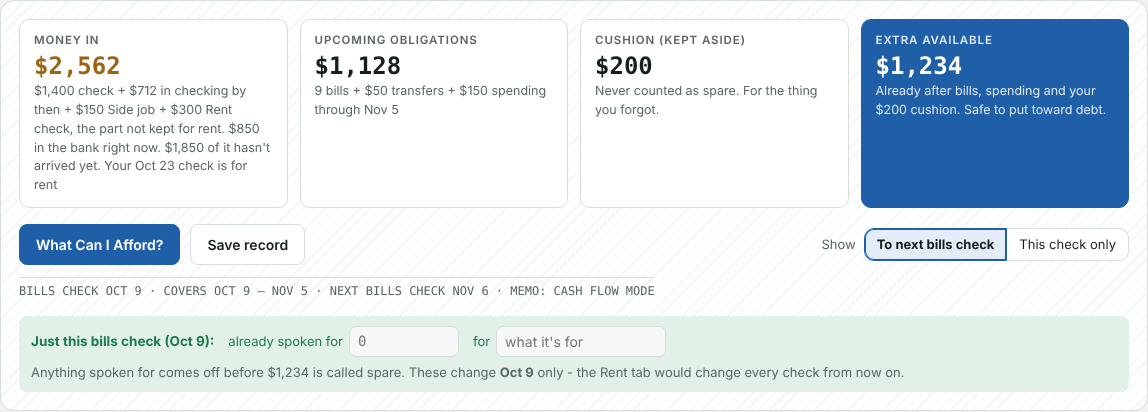
Upbeat Money's summary for one paycheck: money in, bills due before the next check, the cushion kept aside, and what's left to spend

Why it's different

Most money apps are trackers. They show you where your money went after it's already gone. Upbeat Money works the other way: it plans ahead. Tell it your paychecks and your bills, and it shows which paycheck covers which bill and how much is truly safe to spend.

Which check pays which bill

Paid every week or every two weeks? Monthly budgets don't fit. Upbeat Money lines every bill up against the paycheck it comes out of, warns you when a bill lands after a rent check, and tells you what to hold back so nothing gets paid out of rent money by mistake.
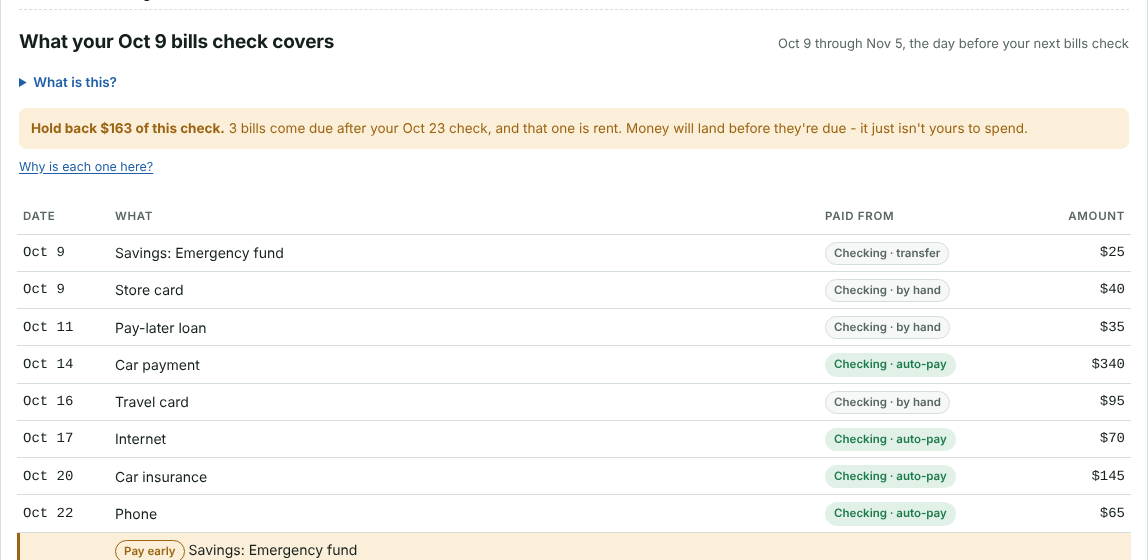
The list of bills one paycheck has to cover, with dates and which account pays each

What can I afford?

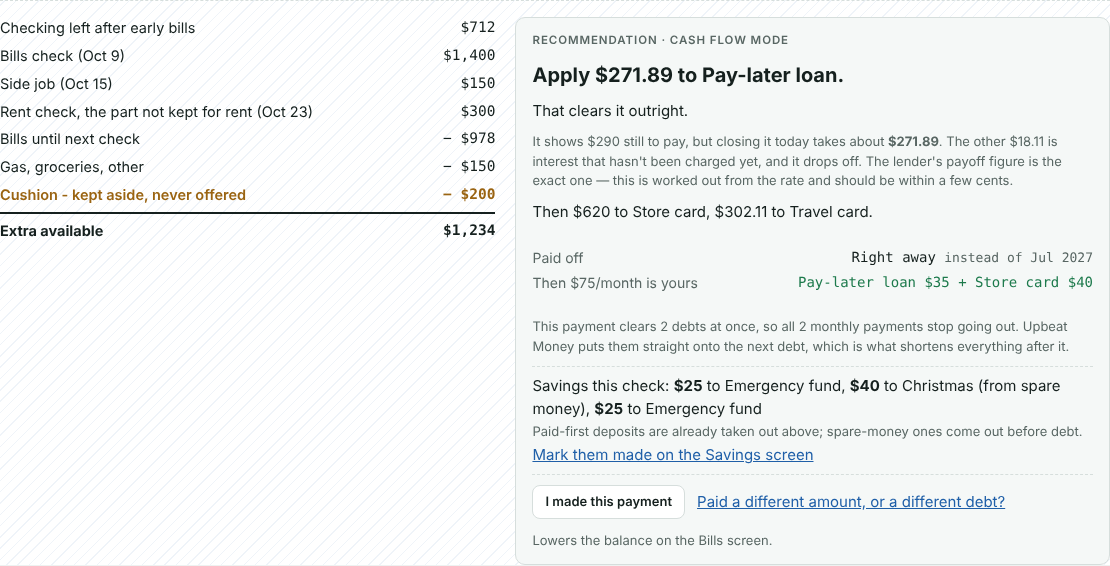
One button shows the sum, line by line: what came in, what's due, gas and groceries, and a cushion that's never counted as spare. Then it says exactly where the spare money should go and when that debt will be gone.

What Can I Afford: the sum on the left and the recommended payment on the right

Your way out of debt

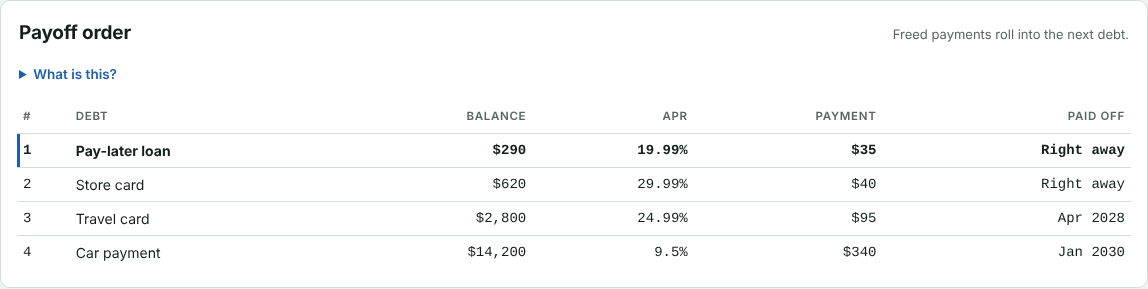
Snowball (smallest balance first), Avalanche (highest interest first) or Cash Flow (frees up monthly payments fastest). See the order, the payoff dates and the interest for each, and log extra payments as you make them. When a debt is paid off, its payment rolls onto the next.

The payoff order: each debt's balance, rate, payment and the month it's paid off

Benefits, done properly

SNAP, LIHEAP or a health allowance card? Each one is kept as its own account. It pays only the bills it's allowed to, it's never counted as cash in your bank, whatever you don't use rolls over the way it really does, and you're warned before a card runs short. Almost no budgeting app handles this.

What's left, and where

  • Checking: your real spending money
  • SNAP card: groceries only, rolls over
  • LIHEAP: the electric bill only
  • A letter says your amount changed? Enter it once - the new amount replaces the old

And everything around it

Auto-pay account

Bills that pay themselves from a second account, and how much is safe to move into it.

Records for tax time

Log a check or stub and keep a copy. Save a record of any pay period as a PDF.

Your numbers stay on your PC

No account to sign up for, no bank login, no cloud. Back it up to a USB stick in one click.

Read a pay stub Add-on

Drop a PDF in and your take-home pay and payday fill in by themselves.

Read a statement Add-on

Drop a bill or card statement in and the amount, due date and balance fill in.

Savings and bill averages Add-ons

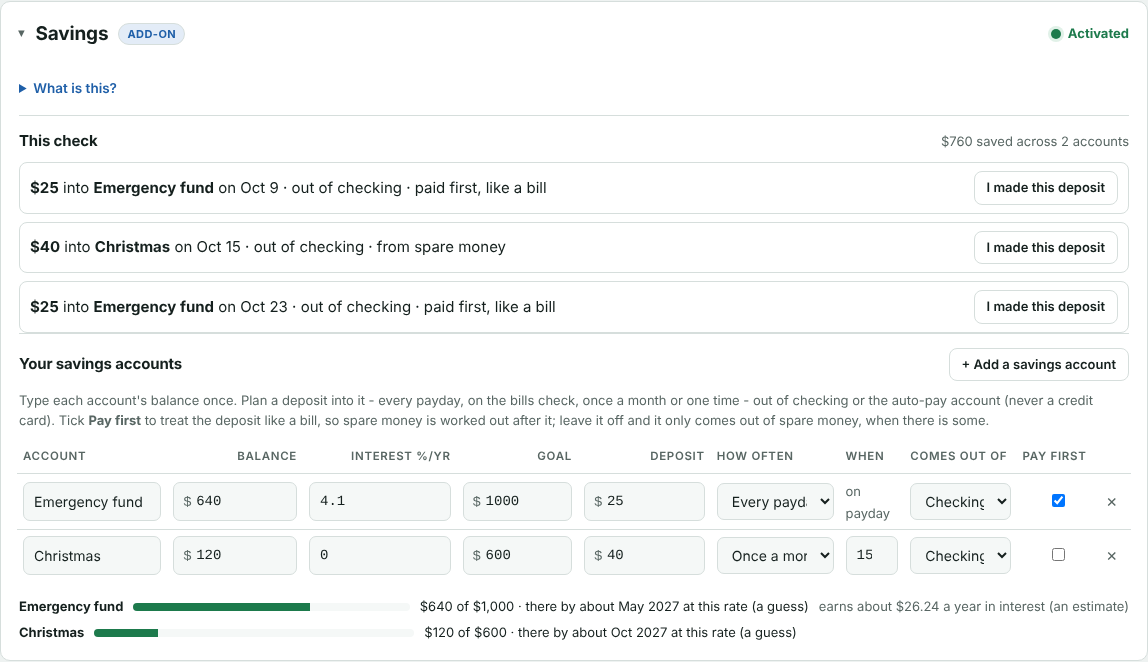
Plan deposits into savings, and see a year of each bill's real amounts.

Money that might be late

Someone who chips in, but not always on time? Tick Wait for it and their money isn't counted until it lands, so you never spend it early.

Credit cards and Wants & needs Add-ons

Card balances that keep themselves current, and a list of things to save up for with a share of each check.

Bill alerts & family bills Add-on

Unpaid bills turn yellow, then orange, then red as the due day comes. Bills you pay for family with their money stay out of your numbers.

The program comes with everything above that isn't marked add-on. Add-ons are bought one at a time, only if you want them - see prices.

Try it before you install

Put your own numbers into the live demos - your paychecks, your debts, a benefits card - and see what Upbeat Money does with them, step by step.

The Savings screen: accounts, goals and the deposits planned for this paycheck

Two ways to get it

Who makes it

Upbeat Money is made by one person, not a big company. It was built to plan a real household's paychecks and bills, then turned into something anyone can use. Questions, ideas or problems go straight to the person who makes it.

Get in touch

Help with the programsupport@upbeatmoney.com Ideas and feedbackfeedback@upbeatmoney.com Privacy questionsprivacy@upbeatmoney.com